Enable Notebooks Sidebar Integration for Google Workspace for Education Accounts
Please integrate the "Notebooks" (NotebookLM) feature into the left sidebar in Geminj for Education accounts. Currently, personal accounts have the Notebooks feature fully enabled in the sidebar, but institutional Education accounts completely lack this section.
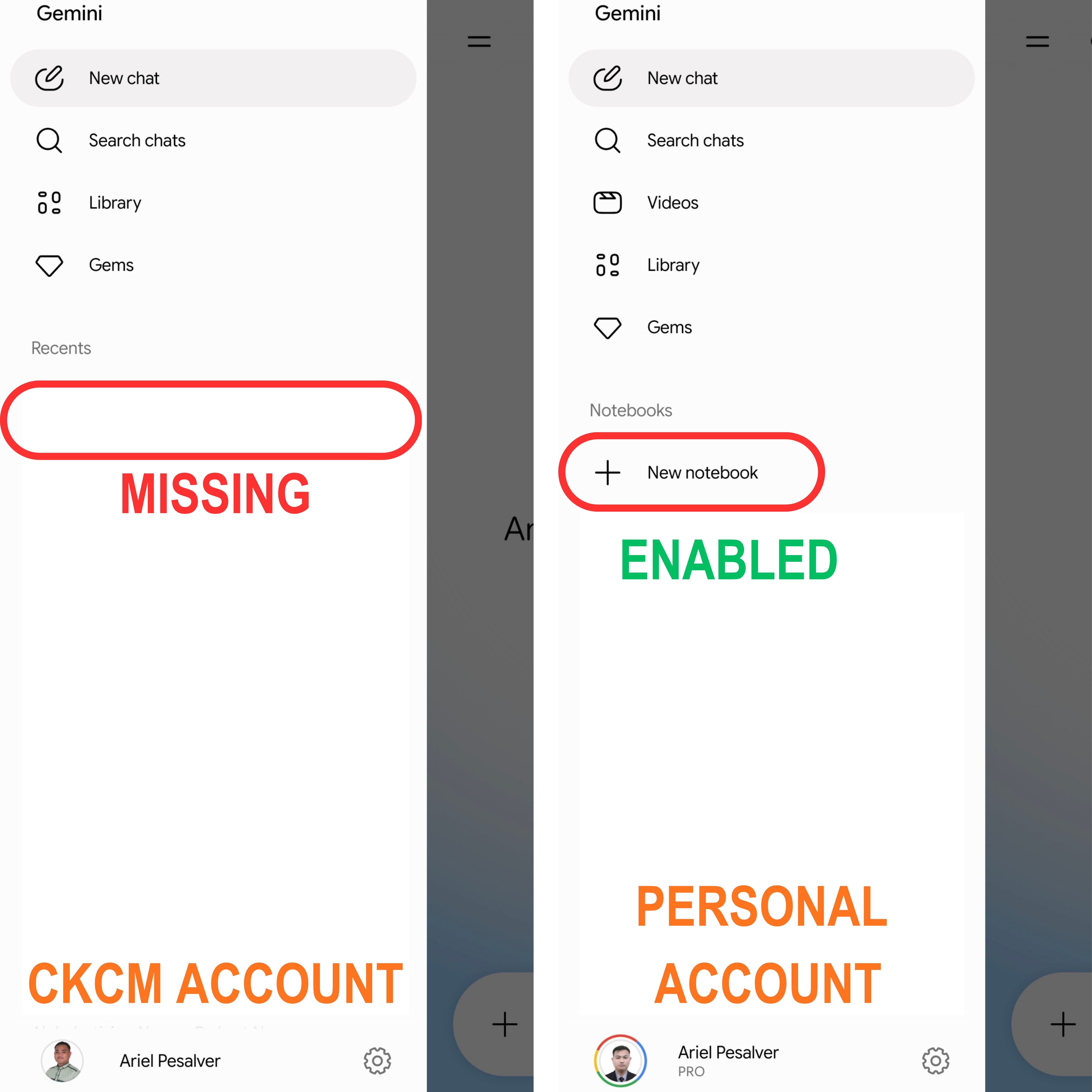
Log in to comment and vote
Comments1
Mr. Ariel O. Pesalver, RCrim
May 21
The discrepancy you're seeing is due to the fact that while NotebookLM is available as a standalone tool for Education (EDU) accounts, its native integration (the "Notebooks" tab) within the Gemini sidebar is currently tiered and often requires an administrative "Alpha" opt-in for Workspace for Education.
1. Enable "Alpha Features" in the Admin Console
The "Notebooks" sidebar in Gemini is currently rolling out to EDU accounts via the Alpha channel. If your admin hasn't opted in, you will only see the standard Gemini interface.
Steps for the Admin:
Go to the Google Admin Console.
Navigate to Apps > Google Workspace > Gemini for Google Workspace.
Look for the Alpha features panel (often located at the bottom or side).
Set the status to ON for your specific Organizational Unit (OU) or for "Everyone."
Wait 24–48 hours: Changes to Gemini's UI architecture usually take time to propagate across EDU domains.
2. Check License Requirements
The sidebar integration is highly dependent on your EDU tier. While personal accounts get this with a "Gemini Advanced" (Pro) subscription, EDU accounts require specific add-ons:
Education Fundamentals (Free): Usually does not have the synced "Notebooks" sidebar yet. You must use the standalone
notebooklm.google.com.Education Plus or Teaching & Learning Upgrade: These licenses grant access to "Gemini for Workspace," which includes the sidebar integration once Alpha features are enabled.
3. Verify Age-Based Access (Mandatory for EDU)
Google restricts Generative AI features in EDU domains based on age. If your account is not marked as 18+ in the Admin Console, the Notebooks sidebar will be hidden even if the service is turned on.
In Admin Console, go to Account > Account Settings > Age-based access settings.
Ensure your OU is set to "All users are 18 or older."
4. Developer "Force" Enable (Experimental)
If you are developing for this platform and want to force the sidebar UI for testing, you can use Chrome Flags. This bypasses some UI-hide logic but still requires the underlying service to be active.
Open Chrome and go to
chrome://flags.Search for #glic (The code name for the 2026 Gemini Sidebar engine).
Set the following to Enabled:
#glic-side-panel#glic-entrypoint-variationsRelaunch Chrome.
Summary Checklist
Feature
Personal Account
EDU Account
NotebookLM Web App
Available
Available (If Admin set to ON)
Gemini Sidebar Sync
Included with Pro/Advanced
Requires Alpha Toggle + Plus License
Data Protection
Standard
Enterprise Grade (Core Service)